MyEducation BC provides access to student learning updates, course schedules, attendance records, and course selections. Parents are expected to be familiar with the use of this site.

Your MyEd Login ID
- Parents: log in to MyEd using the email address that they have on file with the school.
- Students: log in to MyEd using their pupil number + nv (e.g., 0000000nv). Pupil numbers are on student ID cards, this is not the school network username.
Learning Updates
Learning Updates can be viewed from the Pages Top Tab, in the Published Reports area on the
right side of the page.
Learning Updates will appear when published by the school for each reporting period, and only
remain visible until July 31st - after this date, they disappear.
Learning Updates should be downloaded and saved (or printed). They will open in the PDF
format.
Resetting your MyEd Password
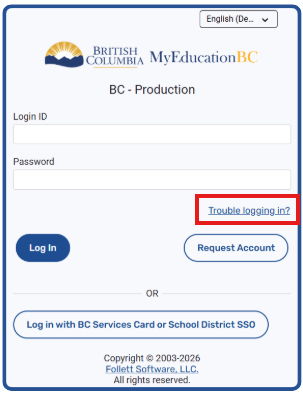
If you need to reset your password, please click the “Trouble Logging In” button as indicated below.